Caffeinated Vitals: My Doctor Asked for My Numbers

What happens when a doctor gives instructions to an arguably neuro-spicy middle-aged developer and said developer can’t find an app that suits them?
They write their own of course.
Shortly after my birthday last year, I had a conversation with my doctor that led directly to this project.
My doctor put me on blood pressure medication and told me that he would like me to start tracking my BP and weight daily to check for efficacy and make sure there are no sudden weight changes, and to share my numbers with him at my next visit.
So I started looking for an app to track this in.
What I Found
There are plenty of health tracking apps, and some of them are fine. Good even.
The problem I kept running into was reporting. I needed a clean way to share my data back to my doctor without screenshots, without manually formatting anything, and without friction.
That reporting gap is what pushed me to build my own.
The Constraint
The core idea was simple: Open the app, enter the number, close the app.
That constraint drove everything. It needed to be easily integrated into my daily routine.
As I said earlier, I’m arguably neuro-spicy, I’ve got my morning routine that I do, quite literally every morning. Get up, get the coffee brewing, while I’m waiting, take my BP readings and log them. An app seems the perfect place to do this. While I’m eating breakfast and drinking my coffee, I’ve got my tablet (an iPad) sitting in front of me that I check email and things with while starting my day. Log the data there, but have it available on my phone (a Nothing Android phone) as well. That last bit was also something most of the others I looked at couldn’t do, at least without a premium subscription.
Caffeinated Vitals can track:
- Blood pressure and heart rate
- Weight
- Blood glucose
- Oxygen saturation (SpO2)
- Medications
They’re all optional, you just need to have a single one enabled to get started. By default, blood pressure and weight are enabled.
Blood pressure entry is optimized for speed, including auto-advance between fields. Weight, glucose, and SpO2 are single-screen entries. The timestamp defaults to now, but it can be edited.
The data that is being synced is minimal, so I built out a delta-based sync system and it is, and will be, free for anyone who wants to sign up for a free Caffeinated account. I’ll talk more about the new Caffeinated ecosystem that I’ve been building in a future post.
The Report
The report is the feature I needed, so it drove the rest of the app.
With a couple taps, the app generates:
- A professional PDF report that can be saved to the device or shared to another app such as messages or emails
- Or a structured plain-text version of the same data
The PDF is suitable for printing, emailing, nearby sharing, air-dropping or any other way to transfer a file. You can also save the PDF to the device if you need to attach it inside the medical provider’s messaging system. The plain-text report is designed for cases where you need to paste the data into a patient portal or secure messaging system.
The flow is simple: generate the report, then save it or share it using the system share sheet.
Here’s a report I generated today with some sample data in it (screenshot from a PDF):
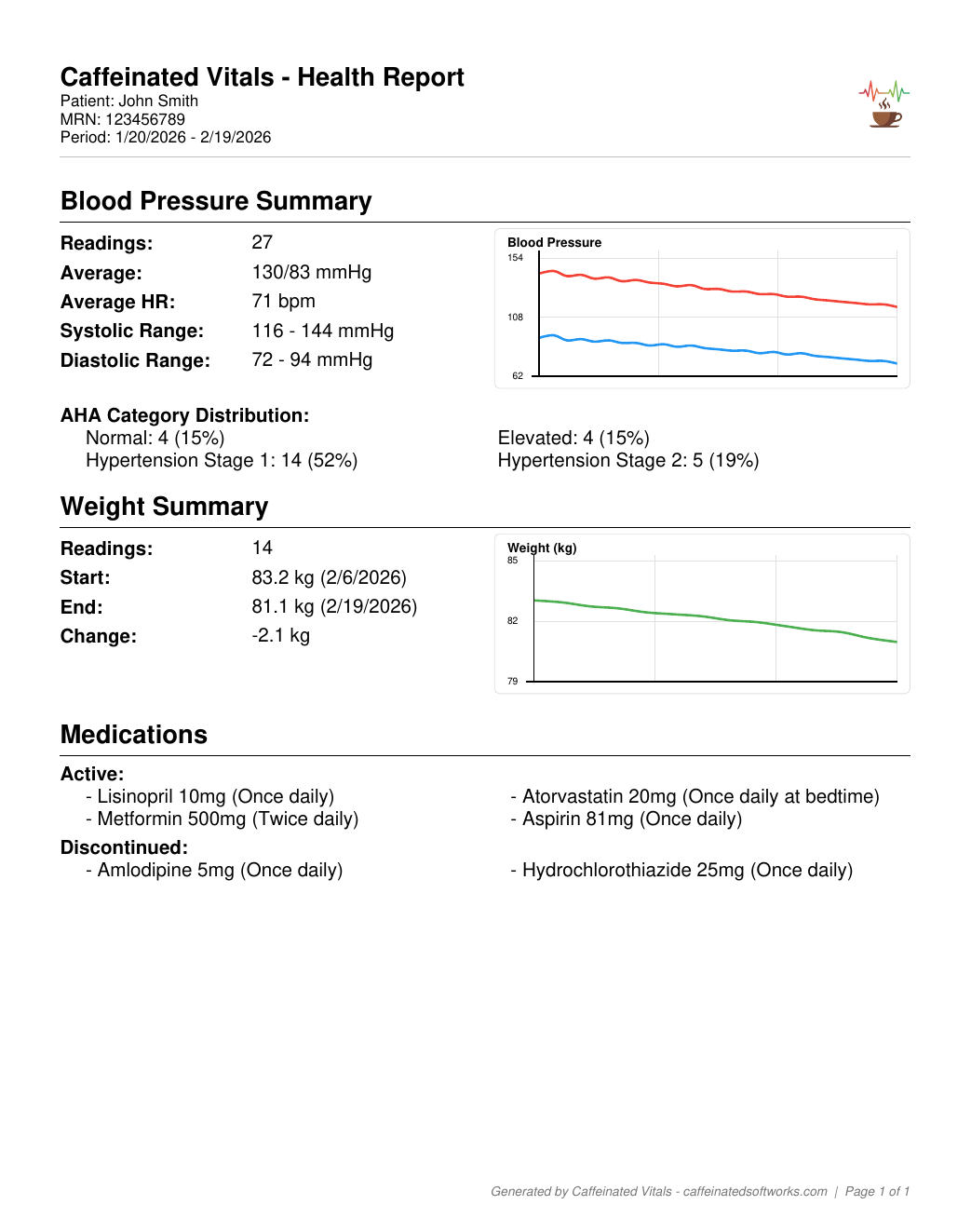
Perfect for printing out before heading to a doctor’s appointment or emailing it to them before hand.
Built to Be Private and Easy to Use
Caffeinated Vitals is offline-first. Your device is the source of truth.
- Local encrypted SQLite storage
- No analytics
- No ads
- No data selling
- Built in backup and restore if you change devices and don’t have a sync account
A free Caffeinated Account can optionally sync your data across devices, but it is not required.
Disclaimer: The app is not a medical device. It does not interpret readings and does not provide medical advice. It is a personal record-keeping tool.
Availability
Caffeinated Vitals is available on the Apple App Store and Google Play.


I'd love to hear about what you've built or if you've got a topic you'd like me to post about.